Blog
One domain, two mail systems: split delivery without illusions
A company has used Google Workspace for years. Gmail is familiar, accounts are under control and moving the entire organization would bring little business value. Then a team appears that genuinely needs Exchange Online: an acquired company already works in Microsoft 365, a department relies on software that requires an Exchange mailbox, or a separate business unit needs close integration with Outlook and Teams.
The first idea sounds simple: keep the domain in Google and forward that team’s messages to Microsoft. This is technically possible, and a well-designed solution can run for years. Yet between “the message arrived” and “we have reliable email” sit several important layers: two-way routing, loop prevention, sender authentication, spam filtering, aliases, monitoring and incident ownership.
This model is called split delivery. It is worth understanding before it becomes a permanent part of the company infrastructure.
What is actually being split
With split delivery, one email domain - for example, company.com - has users in two mail systems. Some mailboxes live in Google Workspace and others in Exchange Online. To customers and partners, everyone still uses the same company domain.
This does not mean that each message lands in two inboxes. That would be dual delivery. Nor is it a forwarding rule set up by an individual user. Split delivery operates at mail transport level: the system identifies the recipient and selects the server responsible for that mailbox.
The distinction matters. In a sound design, every person has one mailbox that acts as the source of truth. Message history, replies, rules, retention and search do not drift apart between Gmail and Outlook.
Google documents split delivery as a supported scenario for organizations where some users work in Gmail and others use another mail system. Its condition is sensible: a recipient should have a mailbox in one system, not both. The details are available in the Google Workspace documentation.
The path a message follows
The clearest design has one main entry point. The domain’s MX record continues to point to Google Workspace. Every message from the internet therefore reaches Google first, passes the initial controls, and is then delivered to Gmail or routed directly to Exchange Online.
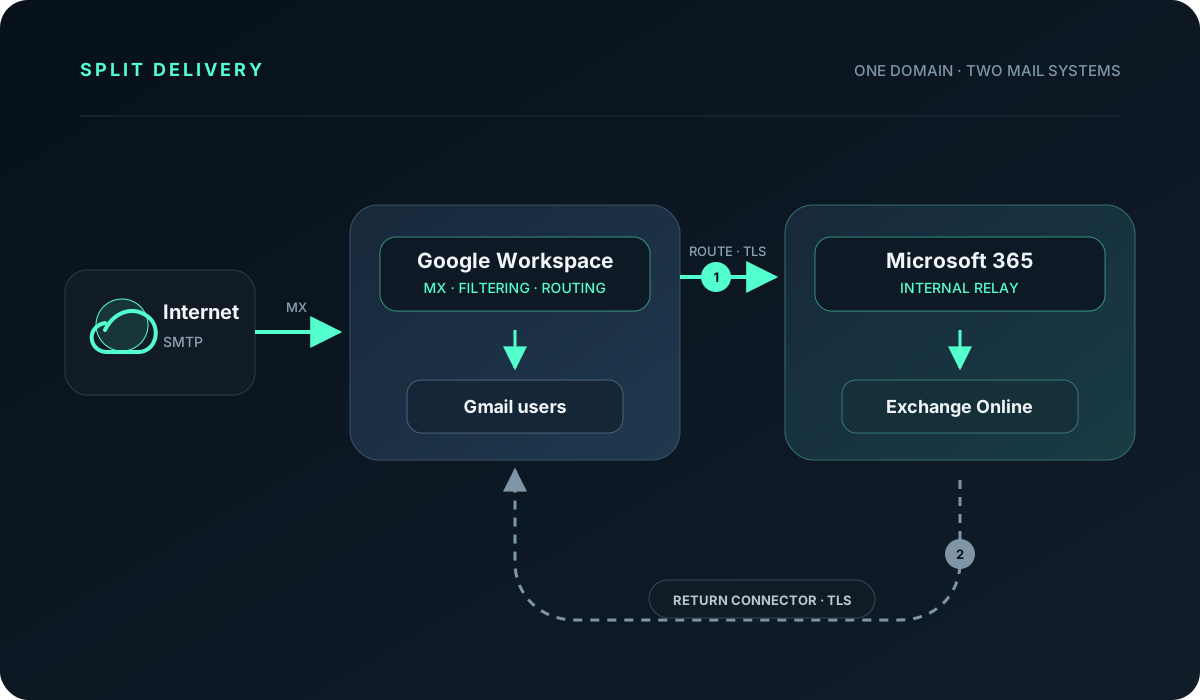
The diagram contains two paths that must be accounted for:
- Google routes mail for the selected group of recipients to Exchange Online.
- Microsoft sends messages for all remaining domain users back to Google through a connector.
The return path is often overlooked. Exchange needs to know that it does not own every mailbox in the domain. In this model, the domain is configured in Microsoft 365 as Internal Relay, while messages for recipients that do not exist locally travel through a controlled connector to Google. Microsoft describes these mechanisms in its small-group coexistence scenario.
Without that return path, internet mail may look perfectly healthy while a message sent from Outlook to a colleague using Gmail ends in a non-delivery report. It is a classic configuration that “passed testing” because only one direction was tested.
When this model makes sense
Split delivery works best when the division follows a real requirement rather than a temporary interface preference.
A company acquisition or organizational merger
One business uses Google Workspace and another uses Microsoft 365. Migrating every mailbox immediately adds risk and consumes the team’s attention during an already demanding integration. A shared domain and controlled routing can create room to consolidate accounts, data and processes in stages.
A business unit working in the Microsoft ecosystem
A separate department may need Exchange Online capabilities, integration with industry software, advanced calendaring or policies available in the Microsoft environment. The rest of the organization does not have to abandon Gmail as a result.
A migration delivered in stages
Moving every user in one evening is not always sensible. Split delivery allows migration by group, with time to observe the outcome and improve the process before the next wave. In this case, define the end date for coexistence at the beginning. Transitional designs have a habit of becoming permanent by accident.
Contractual or organizational requirements
A project, partner or regulated unit may require work in a particular environment. Mail separation can isolate that area without rebuilding the whole company, provided retention, audit and data protection are consciously designed.
If the only requirement is the Outlook application, the answer is different. Outlook can work with a Google account, so launching a second mail platform may be unnecessary. Microsoft describes adding Gmail to Outlook as a standard client feature.
“I sent a test from my private account” is not enough
Business email travels along several paths. A message from an external address to an Exchange user may arrive correctly while communication between people in the same company domain remains broken.
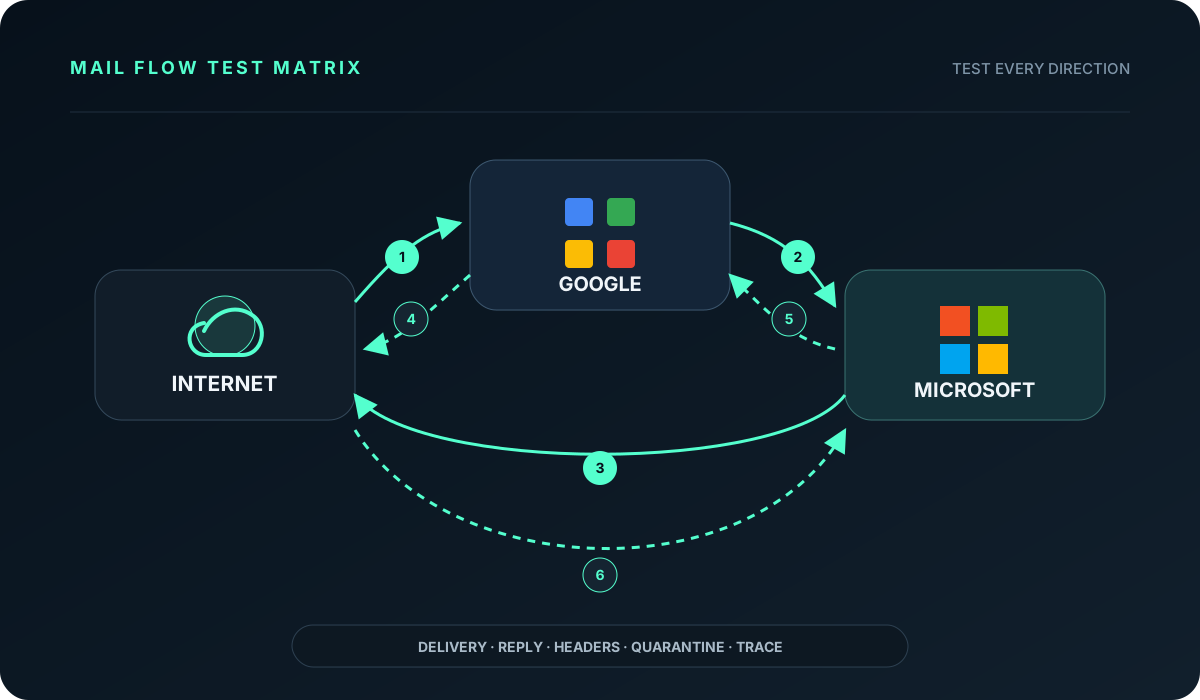
Before production launch, test at least:
- internet → Google mailbox,
- internet → Microsoft mailbox,
- Google → Microsoft within the same domain,
- Microsoft → Google within the same domain,
- Google and Microsoft → external recipients,
- replies returning to both environments.
Aliases, groups, blind copies, automatic replies, mail from business applications, calendar invitations and attachments subject to security policies belong in the test plan as well. A successful test confirms more than the presence of a message in the inbox. Check headers, SPF, DKIM and DMARC results, the connector used, delivery time and whether the message passed through the expected filter.
The most common oversight: internal traffic
Google distinguishes between mail arriving from the internet and messages sent inside the organization. A rule covering inbound traffic alone can deliver customer messages correctly, yet fail when a Gmail user writes to a colleague in Exchange Online.
Microsoft has the mirror image of this problem. If the domain is marked as authoritative, Exchange assumes it knows all recipients in that domain. An address that exists only in Google may then be treated as invalid. Internal Relay and a return connector solve this, as long as the rules do not intercept mailboxes that are local to Microsoft.
This is why split delivery is not designed as a single forwarding rule. It is a closed flow in which both systems must know when to deliver locally and when to pass a message onwards.
The loop between two clouds
When Google needs to pass a message to Microsoft, it cannot simply look up the domain’s public MX record again. That MX points back to Google, so the message would return to where it started.
The route must lead to a specific Exchange Online endpoint assigned to the tenant, or to a controlled technical address. In the other direction, the Microsoft connector should send to Google only those recipients who do not exist locally in Exchange.
Before launch, define hop limits, add useful diagnostic headers and alert on unusual growth in message volume. A mail loop is not always a spectacular outage. It may present as a delay, repeated automatic replies or a queue that grows quietly.
One person, one mailbox
Leaving both Gmail and Exchange active for the same person can feel safer: at least there will be two copies. In everyday work, this quickly creates two message histories, different read states, inconsistent rules, two out-of-office replies and uncertainty about which system sent a response.
A Google account may still be needed for Drive, documents or sign-in. That does not mean it must continue to store mail. Mailbox ownership should be unambiguous, and the directory of users, aliases and groups must reflect the division.
The same principle applies to archiving. Two inbox copies do not replace a retention policy or a backup. During an audit or incident, the company should know where the complete record is held and who can preserve it.
SPF, DKIM and DMARC with two senders
With split delivery, Google and Microsoft can both send messages using the same domain. An external recipient needs to verify that both sources are legitimate.
The domain should publish one SPF record covering both systems, for example:
v=spf1 include:_spf.google.com include:spf.protection.outlook.com ~allGoogle lists this exact combination in its SPF setup guide. Do not publish two separate SPF records; that results in a validation error.
DKIM is enabled separately at each provider. Google signs outbound mail with its selector, while Exchange Online uses Microsoft’s selectors. DMARC remains one shared policy for the domain. Its reports are especially useful after launch because they reveal whether both environments authenticate correctly and whether an unknown sender has appeared.
Introduce policy changes in stages. First collect reports and verify alignment; then move from p=none towards quarantine or rejection. DKIM can be configured using the official instructions for Google Workspace and Microsoft 365.
Two security filters and a possible bypass
A message for an Exchange mailbox may first pass Gmail protection and then Exchange Online Protection. Two layers sound reassuring, but they can classify phishing, attachments and links differently. The administrator needs to know which platform stopped a message and where to investigate it.
There is a less obvious concern. The public Exchange Online protection endpoint remains reachable regardless of the domain’s MX record. A sender can attempt direct delivery to Microsoft and bypass the first filter in Google. The Google → Microsoft path should therefore use a dedicated connector, enforce TLS and apply conditions that identify the trusted source. Microsoft connectors can be restricted by certificate, domain or IP ranges, as described in its secure mail-flow documentation.
Where a message can really disappear
There is no single magical “email” point between sender and inbox. The route is a chain of services, each capable of delaying, rejecting or reclassifying a message.
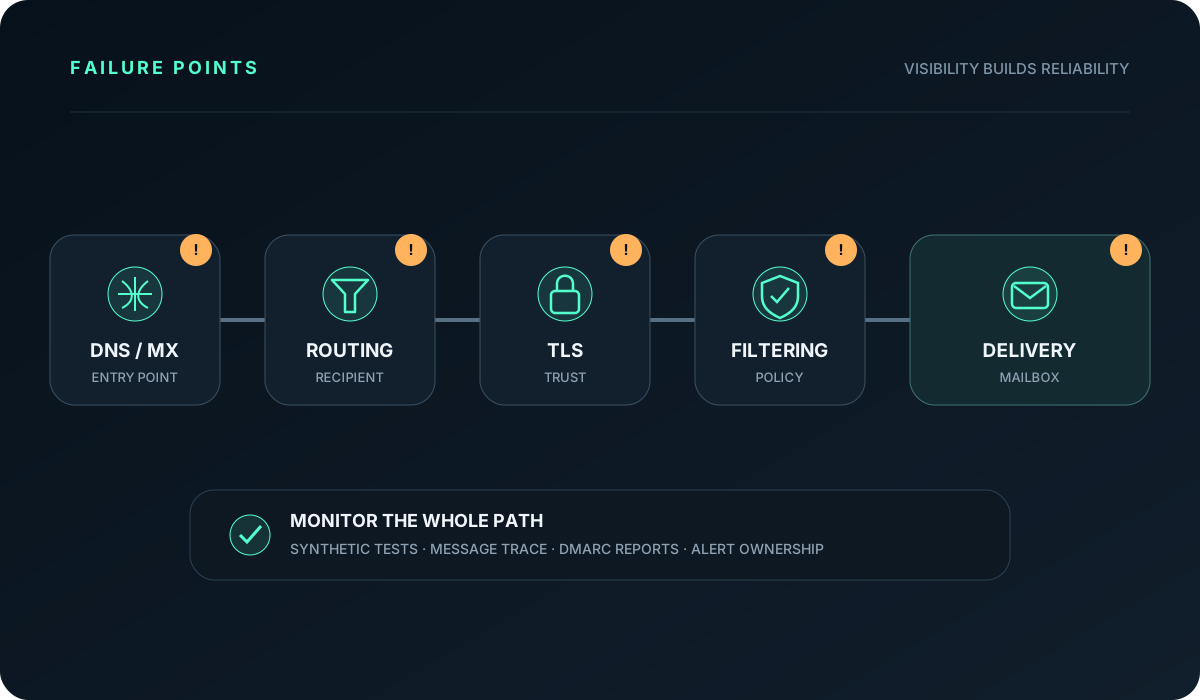
Common weak points include:
- an outdated MX record or incorrect route destination,
- a recipient missing from the routing rule,
- a certificate that does not meet connector requirements,
- a message held by the second spam filter,
- an alias or group present in only one directory,
- a transport rule creating a loop,
- an unlicensed mailbox or exceeded limit,
- nobody receiving an alert from the queue.
Reliability comes from visibility. The operating model needs logs from both providers, Message Trace in Microsoft 365, Email Log Search in Google, DMARC reports and synthetic messages sent regularly through critical routes. An alert without an owner has little value, so each failed path should have a defined response procedure.
Is this a backup mail service with another provider?
No. When the MX points to Google, Google remains the first entry point for the whole domain. An outage or incorrect Google routing rule can therefore affect Exchange Online recipients too.
SMTP queues messages and retries after temporary failure of the next server. This limits the impact of short outages, but it is not a business continuity strategy. Microsoft states that messages its connector cannot deliver are retried for a limited period, currently up to 24 hours. After that, the sender may receive a non-delivery report.
Adding a lower-priority secondary MX does not automatically fix this. The alternate server would need to handle every recipient safely and route each one to the right platform. Without a complete design, a “backup MX” introduces a new filter bypass and another opportunity for loops.
Calendars, groups and processes are part of the design
Mail can work perfectly while users still feel the division. Cross-platform free/busy information, room booking, mailbox delegation, distribution groups, organizational contacts and calendar invitations do not always cross the boundary as naturally as ordinary email.
In its small-pilot guidance, Microsoft notes that free/busy information is not automatically available for users on the other mail system. A permanent architecture therefore needs a clear decision about collaboration features, directory ownership and synchronization of employee changes.
Offboarding spans both environments as well. Removing an account in one panel can leave an alias, routing rule or active access in the other. The departure process should close the mailbox, license, groups, delegations and transport rules as one controlled task.
“Forever” means continuous maintenance
Split delivery can be a target architecture. It should not be a configuration left without an owner. Providers change interfaces, certificates renew, teams appear and disappear, and new applications begin sending mail from the company domain.
A minimum maintenance model includes:
- an up-to-date list of mailboxes and the systems that own them,
- review of routing rules and connectors after significant changes,
- automated tests of critical directions,
- monitoring of queues, delays and rejection volume,
- SPF, DKIM and DMARC report monitoring,
- a tested failure procedure,
- named owners on both sides of the integration.
At that point, the service no longer depends on the person who remembers “where the forwarding rule was clicked years ago”. It becomes a normal, observable system.
When one platform is the better choice
The division does not always justify its cost. If the requirement is simply a preferred desktop application, connecting Google to Outlook is easier. If most company processes are moving to Teams and Exchange, a complete Microsoft 365 migration may cost less in the long run. Likewise, an organization centered on Google Meet, Drive and Gmail may decide that maintaining an isolated Exchange environment adds little value.
Before choosing, answer five questions:
- Does the separate group need Exchange server capabilities, or only the Outlook client?
- Does coexistence have an end date, or is it the target architecture?
- Who owns routing, authentication and monitoring?
- How should calendars, groups, retention and incident response work?
- What does the added complexity cost compared with migration?
With specific answers, split delivery can solve a real problem without turning the whole organization upside down. If the answers are “we will decide later”, the division is likely to become operational debt that is difficult to diagnose.
Conditions for operating two mail systems
Google Workspace and Microsoft 365 can serve the same email domain at the same time. The key is to treat the arrangement as an integration of two critical systems: one mailbox owner per user, routes in both directions, secured connectors, correct SPF/DKIM/DMARC and monitoring along the entire message path.
A properly maintained split-delivery setup should be invisible to users: messages arrive, replies return and IT can reconstruct the route. This requires documented architecture, monitoring and regular testing.
If you are considering Google Workspace and Microsoft 365 coexistence, or need to bring an existing split under control, our IT Partner service can assess mail flow, domain security and operational procedures, then design a model that fits the organization’s real processes.