Blog
Dual delivery: a safe migration path or double the chaos?
An email migration has an uncomfortable moment of truth. For weeks, the team prepares accounts, domains, security controls and data. Then comes the evening when the organization must switch from the old system to the new one. From that point, a missing group, incorrect alias or incompatible application is no longer an item on a checklist. It becomes a user-facing problem.
It is natural to ask whether messages can reach both systems for a while. The old mailbox continues to work, the new one receives a copy, the team observes real mail flow and only then commits to the final cutover.
This model is called dual delivery, and it can be a useful migration stage. It creates time to find gaps, compare filters and validate the target platform under real traffic. It does not synchronise two mailboxes or automatically protect against every failure. Without a clear purpose and end date, it creates two different versions of the same correspondence.
One message, two delivery locations
With dual delivery, a message first reaches the system identified by the domain’s MX record. That system delivers it to the primary mailbox and sends an additional copy to the second mail platform.
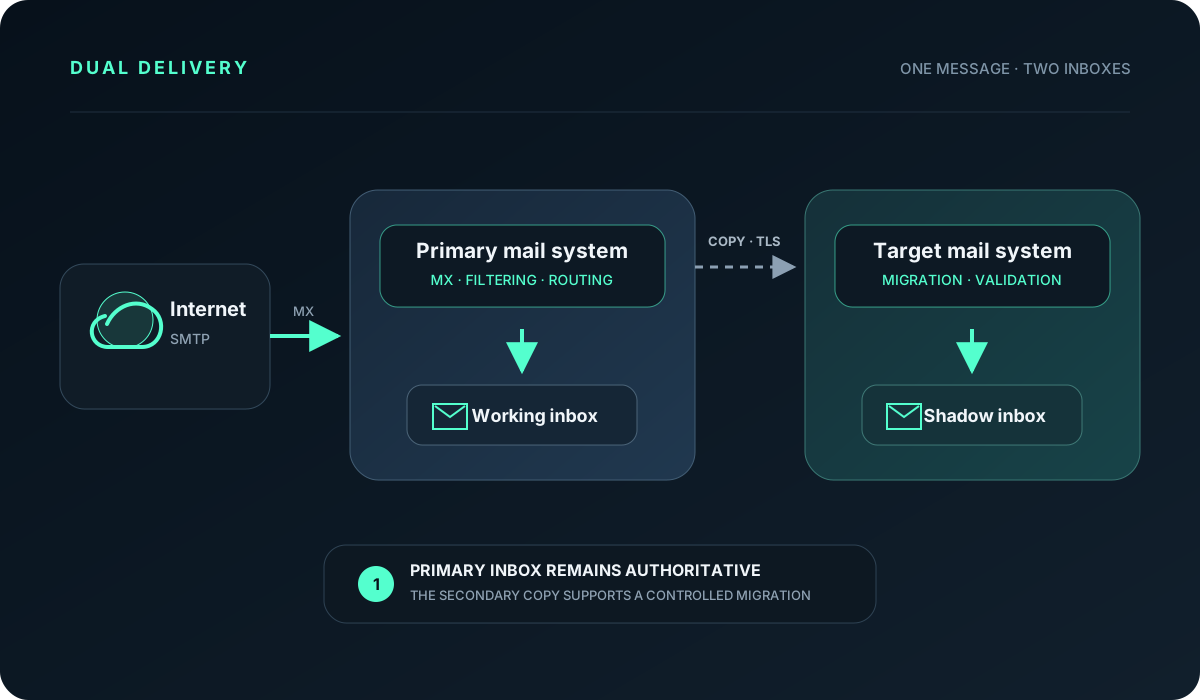
The user continues working in the primary mailbox. At first, the second mailbox has an observation role: it receives real mail and allows the team to validate routing, security policies, aliases and target-platform performance.
Google Workspace officially supports this model and documents simultaneous delivery to Gmail and a non-Gmail system, such as Microsoft Exchange or an archive server. Google recommends Gmail as the primary server but also supports keeping the legacy server primary during a pilot or migration. Google dual delivery documentation
Dual delivery differs from the split delivery model discussed in our previous article. With split delivery, different users have their mailboxes in different systems. With dual delivery, the same message is copied to two locations.
Why it works well as an early migration stage
A complete cutover requires confidence in several things at once: user accounts, DNS, delivery routes, security controls, sending applications, mobile devices and support procedures. A few synthetic test messages cannot expose every dependency.
Dual delivery introduces real traffic into the target platform before the entire organization depends on it. It helps verify:
- whether every active address exists on the target side,
- whether aliases, groups and shared mailboxes work,
- how the new platform classifies spam, phishing and attachments,
- whether messages from forms, CRM, finance systems and devices arrive correctly,
- how much delay the additional route introduces,
- whether administrators can locate a specific message in the logs,
- whether retention and data-protection policies cover the right accounts.
The main benefit is not having two copies. It is the ability to observe the target system without making the organization immediately dependent on it.
Scenarios where dual delivery is justified
Moving between Google Workspace and Microsoft 365
The target platform is prepared, accounts exist and historical data is moving in batches. Dual delivery causes new incoming messages to appear in the destination as well, narrowing the gap between the first data transfer and final cutover.
It does not remove the need for incremental migration. Sent mail, folders, labels, contacts, calendars and changes made by users still need a separate process.
A pilot before a purchase or migration decision
The organization wants to evaluate a platform using real messages without changing everyone’s working habits. A selected group can assess delivery, protection and administration before the company announces a migration.
A pilot needs success criteria. “Messages arrive” is not enough. Measure delivery time, false positives, alias completeness, log quality and the number of administrator interventions.
A company acquisition or merger
After a transaction, communication continuity often needs to be secured before the target platform has been chosen. Dual delivery can give the team time for inventory and testing. If separate groups will ultimately remain in different systems, the later design may be split delivery. If everyone is moving to one platform, dual delivery should end with a cutover.
Comparing email protection
The same messages can temporarily reach two platforms to compare spam, phishing, malicious attachment and suspicious link detection. Interpret the results carefully: the secondary platform receives mail forwarded by the primary one and may see a different SMTP connection context.
A copy for an archive platform
Google lists an archive server as a possible additional destination. This makes sense only when the second system really is a controlled archive. An ordinary second mailbox does not provide immutability, retention, auditing or protection from deletion. Legal and compliance requirements more often call for journaling or a dedicated archive than another user inbox.
What dual delivery copies - and what it does not
At the beginning, the mailboxes may look identical. They contain the same new inbound messages and have similar account structures. The first user action introduces the difference.
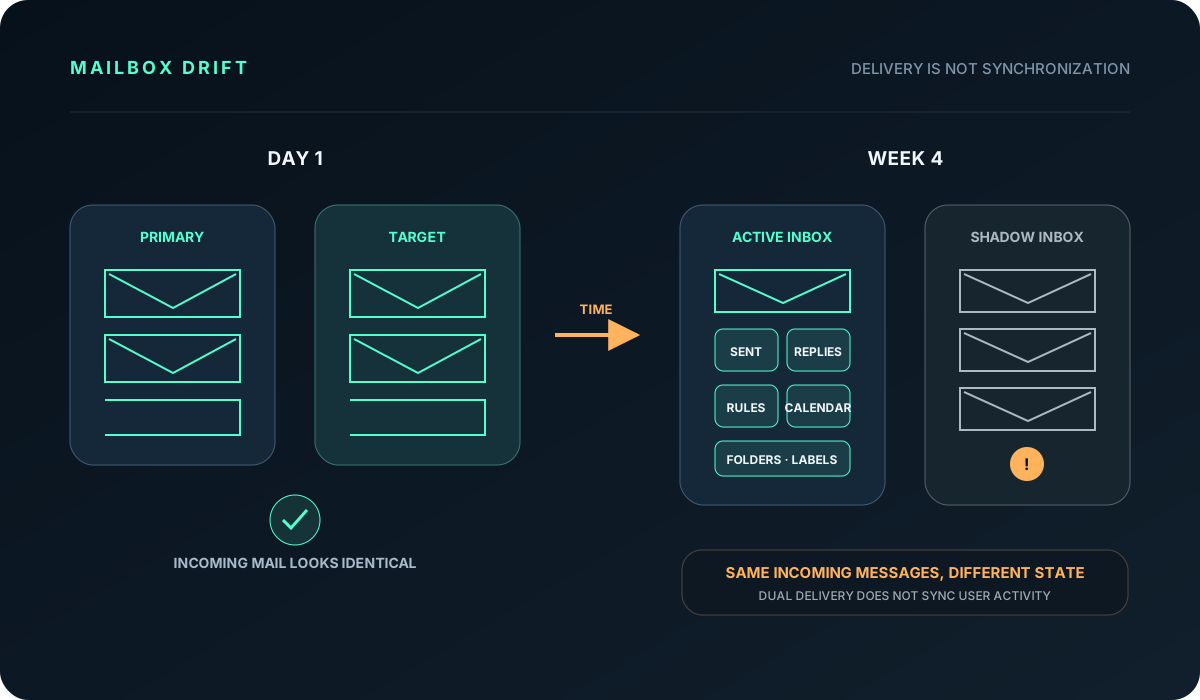
Dual delivery can copy an inbound message. It does not automatically synchronize:
- read and unread state,
- replies and sent items,
- deletion and message moves,
- folders and labels,
- mailbox rules,
- delegation and permissions,
- contacts,
- calendars, meetings and resource bookings,
- tasks and notes,
- mail client settings.
If a user begins working actively in both inboxes, two different histories emerge within days. Merging them later can be harder than completing a planned migration.
That is why every dual-delivery project needs a clearly designated working mailbox. Users reply, send, manage calendars and perform everyday actions there. The other mailbox remains observational until the agreed cutover point.
Dual delivery is part of the plan, not the entire migration
A safe email migration consists of several workstreams that must meet in the right sequence.
1. Inventory
Before adding a route, document domains, mailboxes, aliases, groups, sending applications, transport rules, devices and integrations. Addresses not owned by ordinary users deserve particular attention: invoicing, forms, monitoring, scanners, alarm systems and automated notifications.
2. Target-platform preparation
Create accounts, assign licenses, configure the domain, access policies, MFA, email protection and DKIM. A user should not receive copies in a mailbox that nobody can open or whose policies are incomplete.
3. Historical data migration
The first migration wave transfers mail, folders, calendars and contacts. Some migration tools then run further incremental synchronizations. Dual delivery helps with new inbound messages but does not replace those sync passes.
4. Additional delivery
The primary platform continues receiving mail through MX and delivers to existing mailboxes. It sends a copy over a direct, encrypted route to the target platform. The copy must not be routed back through the same domain’s public MX when that would return it to the primary system.
5. Pilot and observation
Test each recipient type and inspect delays, quarantine and logs. Selected users or administrators confirm that the target system is complete and predictable.
6. Final synchronization and cutover
During an agreed window, users stop changing the old mailbox, the team runs a final delta sync, switches MX or delivery rules and directs users to the new platform. The target mailbox now becomes the source of truth.
7. Controlled period and route removal
The old platform may remain read-only for a short, defined period. Turn off dual delivery after the acceptance criteria are met. Leaving it active “just in case” with no end date preserves cost and ambiguity.
The primary system must be unambiguous
The server named in public MX records is the first receiver of internet mail. During a typical migration, the existing platform retains this role until cutover. It performs the initial filtering, local delivery and copy operation.
The secondary platform needs a secured reception endpoint and a complete list of recipients covered by the pilot. Internal mail also matters. Some systems deliver it locally without consulting public MX, so the dual-delivery rule must cover both inbound and internal traffic if both should appear in the destination.
Google can apply the setting to an organizational unit or configuration group, making it practical to pilot a limited population. Routing changes may need time to propagate, so do not schedule them minutes before an executive test.
When the second copy fails silently
One advantage of dual delivery is that a secondary-system problem need not block the working mailbox. The same characteristic has a downside: users may not notice that target copies have been missing for several hours.
Google offers an option to suppress bounces from the additional destination. This prevents a sender receiving errors from a mailbox they do not yet use, but it makes administrator monitoring essential. When bounces are hidden, someone must watch logs, queues and synthetic messages.
Useful monitoring covers:
- message counts accepted by both systems,
- differences in delivery time,
- rejections and TLS errors,
- unknown recipients,
- messages quarantined on only one side,
- continuity of a recurring synthetic message,
- routing-rule changes in the administrative audit log.
Without that evidence, dual delivery creates confidence but does not prove that the second copy is complete.
SPF, DKIM and DMARC during migration
Receiving copies does not automatically mean the second system should send company-domain mail. While users still work in the primary platform, one clear outbound path is easier to operate.
If the target platform also sends during the pilot, it must be authorized in SPF and sign with its own DKIM. A domain publishes one SPF record even when it covers several providers. DMARC reports reveal whether messages from both environments authenticate and align correctly.
Avoid tightening several controls on cutover night. Enable signing and reporting first, verify the results, and only then strengthen rejection policy. This keeps a DNS mistake from turning a controlled migration into widespread non-delivery.
Why dual delivery is neither backup nor high availability
A second mailbox can help recover some inbound messages, but it is not a complete backup. It does not automatically protect sent items, calendars, contacts or changes made in the primary inbox. If a deletion rule or malicious administrator action reaches both environments, two copies can still disappear.
It is not automatic provider redundancy either. When MX points to the primary platform, every message must pass through that platform first. A long outage, incorrect DNS or broken routing rule can affect both delivery destinations.
A real continuity plan separately addresses DNS, message acceptance, SMTP queues, user access, outbound sending, historical data, identity and cutover procedures. Dual delivery may contribute to that plan, but it cannot replace it.
Common traps
The same issues tend to recur:
- some aliases or groups do not exist in the target system,
- internet mail is copied but internal mail is omitted,
- users begin replying from both inboxes,
- out-of-office replies run in two places,
- secondary copies land in a separate quarantine,
- the copy follows MX and loops back to the starting point,
- sent items and calendars are missing from the final delta migration,
- old licenses and routes remain active months after cutover,
- nobody can identify the authoritative correspondence archive.
Each problem becomes manageable when the design defines the primary system, the permitted user workflow and the migration exit conditions.
Dual, split, migration or archive?
Technically similar mechanisms answer very different needs. The choice should begin with the business outcome.
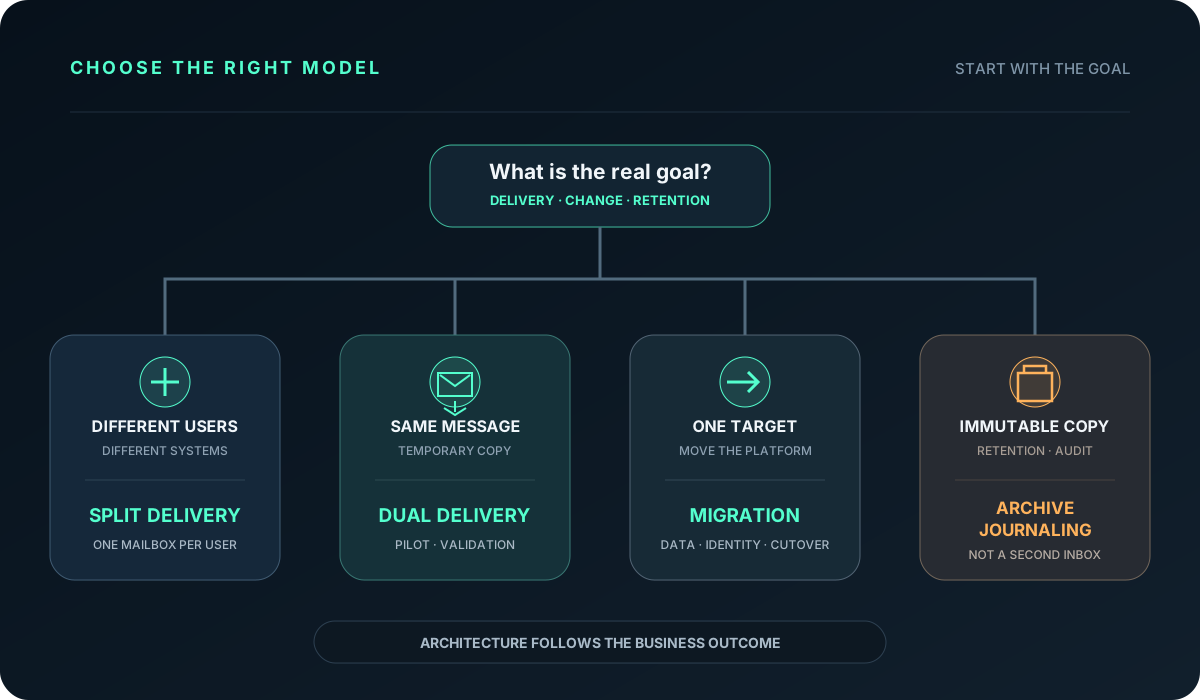
- Choose split delivery when different users will permanently work in separate systems under one domain.
- Use dual delivery for temporary delivery of the same message to two locations, usually during a pilot or migration.
- A migration moves the complete service: data, identity, configuration, processes and ownership.
- Archiving or journaling addresses the need for a controlled, often immutable copy.
Using dual delivery as a substitute for archiving or permanent synchronization ends badly because that is not what the mechanism was designed to provide.
When dual delivery can be turned off safely
The end date belongs in the plan before the first copy is enabled. A calendar date alone is not enough; the project needs acceptance criteria.
Dual delivery can be disabled when:
- every active mailbox, alias and group exists on the target platform,
- historical migration and final synchronization completed successfully,
- critical sending applications passed testing,
- SPF, DKIM and DMARC show expected results,
- users can work effectively in the new environment,
- monitoring and incident response are ready,
- the team has a confirmed rollback plan for the cutover window,
- business owners have accepted the migration outcome.
After this point, two active mailboxes no longer improve safety. They preserve unnecessary complexity.
Conditions for completing the migration safely
Dual delivery is valuable when an organization wants to reduce the risk of a sudden email cutover. It makes the destination observable under real load, exposes missing addresses and prepares the team for the change.
One mailbox should remain active while the other serves a clearly defined migration purpose. The project needs an owner, monitoring, success criteria and an end date. Without those decisions, dual delivery can become a permanent and difficult-to-maintain part of the infrastructure.
If you are planning a Google Workspace, Microsoft 365 or other email migration, our IT Partner service can prepare the inventory, routing architecture, test plan, cutover and controlled rollback so that mail remains available at the most important point of the transition.